
On this page
Finding the best recruiting sourcing tools is harder than comparing feature lists. A tool can find many profiles yet provide little evidence that someone fits your technical requirements. For teams hiring developers, the strongest starting point is usually a specialist research tool that can examine public work and explain why each candidate matches. Broader databases suit teams recruiting across many job families, while outreach platforms suit teams that already know whom they want to contact.
This guide compares four kinds of sourcing option by search coverage, candidate evidence, workflow fit, outreach support and pricing transparency. It does not present a top 10 ranking because there is not enough consistent product and pricing information here to compare ten named platforms fairly.
The short answer
The right option depends on where your candidates can be found and what your team must verify before outreach. For developer hiring, start with evidence from public technical work. For mixed hiring, favour wider coverage. Use outreach software when candidate discovery is already working, and begin with manual research when your volume is low.
- Specialist developer research tools: Best for finding developers and checking role fit through public technical work.
- General candidate databases: Best for teams sourcing across technical and nontechnical roles from one place.
- Outreach and recruiting workflow platforms: Best for teams that have candidate lists but need help managing contact and follow-up.
- Manual search and free tools: Best for occasional hiring, early process testing or teams that cannot yet justify another paid product.
| Option type | What it does | Best for | Pricing basis |
|---|---|---|---|
| Specialist developer research tools | Search public developer work and help assess technical fit | Focused developer hiring | Varies by product; AyHire pricing is not published in the available product information |
| General candidate databases | Search broad professional profile collections | Mixed role types and recurring sourcing | Not published here |
| Outreach and recruiting workflow platforms | Organise candidate contact, follow-up and pipeline activity | Teams with an existing discovery process | Not published here |
| Manual search and free tools | Combine search engines, public profiles, spreadsheets and existing accounts | Low-volume sourcing and process testing | Depends on the services selected |
How we ranked these
We did not rank named products because only AyHire had enough confirmed product information for a useful entry, and ranking a business against itself would mislead you. Instead, we compare the main kinds of option using criteria that you can apply during a trial, demonstration or procurement review.
Watch "The BEST Sourcing Tools For Recruiters in 2026" on YouTube
AyHire publishes this guide and is one of the specialist tools discussed below. We place it according to its documented focus on developer research, rather than treating it as the automatic first choice for every hiring team.
Search coverage
Start by asking where the tool looks. A broad professional database may work well when you hire sales, operations and technical staff. A developer-focused tool may be more useful when public code, project history and technical contributions matter to the role.
Coverage is not simply the number of profiles. Your test should use a real role and its actual constraints. Check whether the results include plausible candidates in the required location, technical area and experience range, rather than counting every profile returned.
Evidence behind a match
A result is more useful when a recruiter or hiring manager can inspect why the person was selected. For a developer role, that may mean links to public work that relates to the role requirements. Evidence also makes it easier to challenge a weak match before anyone sends a message.
During a trial, take several candidates from the first results page and trace each important assessment to its basis. If the system gives a score without supporting detail, decide whether your team can review that score responsibly.
Control over role requirements
A sourcing tool should let you express the requirements that genuinely affect the search. Separate must-haves from preferences before testing. Otherwise, a tool may appear accurate because the brief is broad enough to fit almost anyone.
Use one difficult requirement in the test, such as work in a particular technical area. Then look for false positives and false negatives. A useful system should help you understand how the requirement affected its findings, even when you disagree with the result.
Workflow fit
The best search results still create work if recruiters must copy every profile into another system by hand. Map what happens after discovery. Your process may require hiring-manager review, shared shortlists, outreach, notes or transfer into an applicant tracking system.
Do not buy a larger platform merely because it covers more stages. A focused tool can be the better fit when your existing systems already handle outreach and applicant management. A broader platform can make sense when fragmented handoffs are the main problem.
Pricing basis and limits
Ask how usage is measured before comparing prices. Possible limits can relate to searches, seats, profiles, exports, messages or access to contact information. The relevant question is what a normal hiring month would consume under each model.
Pricing is not included when it has not been confirmed. Request a written quote and identify any extra services needed to complete your workflow. A low entry price can be misleading if essential research, outreach or data transfer requires another subscription.
What we did not rank on
We did not use unsourced ratings, unverified customer totals or claims about hiring results. We also did not treat the longest feature list as the strongest choice. Features matter only when they solve a defined part of your sourcing process.
The video below shows another recruiter's view of sourcing tools and can help you prepare questions for product demonstrations: The BEST Sourcing Tools For Recruiters in 2026 by Wiza.
What are the main kinds of recruiting sourcing tools?
Recruiting sourcing tools fall into distinct groups based on where they search and which part of the workflow they support. The main choice is between specialist research, broad candidate databases, outreach workflow software and a manual toolset. Each can work, but each leaves a different part of the process to your team.
Specialist developer research tools
Specialist research tools suit roles where public technical work can help the team judge relevance. They narrow the search around developer evidence rather than treating job titles and profile keywords as the full picture. This can help recruiters present a hiring manager with reasons to review a candidate, rather than an unexplained list.
Developer candidate discovery from AyHire searches for people matching a role description and evaluates public profiles against specified must-haves. It searches and evaluates public GitHub work, returns evidence-linked profiles, checks whether candidates may be open to work and creates a shared shortlist for team review.
Best for
- Teams hiring developers whose public GitHub work is relevant to the role.
- Recruiters who need evidence to discuss a candidate with a technical hiring manager.
Strengths
- Assessments include links that support profile findings.
- Role searches can evaluate public profiles against specified must-haves.
- Searches and shortlists are available through Claude Code, Codex, Cursor and other agents over MCP.
Limits
- It is focused on developers, so it is not a general database for every job family.
- Public GitHub work cannot represent every qualified developer.
- The product information does not publish pricing.
Who should skip it
Skip a developer research tool when most of your roles are outside software development or when public technical work has little bearing on the hiring decision. You may also need a separate system for functions outside discovery and shortlist research.
Teams that want to examine this category further can read our guide to GitHub recruiting tools. It covers the role of public development work in candidate research.
General candidate databases
General databases aim to give recruiters one search environment for many kinds of role. They can suit an internal recruiting team that moves between engineering, finance, operations and commercial hiring. Their broader scope can reduce the need to learn a separate discovery method for every department.
Breadth has a trade-off. A general profile may tell you what a candidate says they have done, but it may not provide the work evidence needed to assess a narrow technical requirement. Test how much detail the platform gives you before expecting hiring managers to review its results.
Best for
- Teams recruiting across several job families.
- Recruiters who need one repeatable search process for many roles.
Strengths
- Broad scope can support mixed hiring plans.
- A shared search interface can make recruiter training simpler.
- General professional information may be enough for an initial longlist.
Limits
- Broad coverage does not prove depth for developer research.
- Keyword and title matching can miss people whose work uses different language.
- Contact access, exports and workflow features may depend on the selected product and plan.
Who should skip it
Skip this category as your primary research method when technical evidence is central to deciding whom to contact. You can still use a broad database alongside a specialist tool, but define which system owns discovery and which one stores the final record.
Outreach and recruiting workflow platforms
Outreach platforms focus on what happens after you identify possible candidates. They can organise contact sequences, reminders, replies and recruiter activity. Some products may also include search, but you should test discovery and outreach as separate jobs rather than assuming strength in one proves strength in the other.
This category works best when candidate identification is already reliable. If the input list is weak, faster outreach creates more irrelevant messages. Review how the platform handles consent, suppression, duplicate records and human approval under your own policies before connecting it to live campaigns.
Best for
- Recruiting teams with a reliable source of candidate profiles.
- Teams that need a consistent process for personalised contact and follow-up.
Strengths
- Keeps outreach activity in a shared workflow.
- Can reduce missed follow-ups when several recruiters work on a role.
- Makes it easier to separate discovery from contact execution.
Limits
- Outreach features do not establish candidate quality.
- Automation can spread a weak message or poor target list quickly.
- Integrations and usage limits vary by platform.
Who should skip it
Skip a dedicated outreach platform if your team contacts only a small number of candidates and can manage follow-up in its current system. Fix the quality of candidate discovery first when recruiters cannot explain why the people on a list fit the role.
Manual search and free tools
A manual approach combines public search, professional profiles, developer communities, spreadsheets and tools your team already has. It gives the recruiter direct control over every query and review decision. It can be a sound way to learn what information matters before buying software.
Manual sourcing becomes difficult when search logic lives in one recruiter's notes or when several people review the same profiles. Document queries, rejection reasons and evidence links from the start. That record helps you compare a future product against a real baseline rather than against memory.
Best for
- Occasional hiring where sourcing volume is low.
- Teams defining a new role or testing a sourcing process.
Strengths
- Lets the team learn before committing to a new platform.
- Gives recruiters control over the search and review method.
- Can use existing accounts and internal tools.
Limits
- Research and record keeping can require substantial recruiter time.
- Results may vary between recruiters unless the method is documented.
- Free access can still carry usage, access or export restrictions.
Who should skip it
Skip a mainly manual process when repeated hiring makes research a bottleneck or when managers cannot see how candidates were assessed. A sourcing product becomes easier to justify when it replaces a defined, measured task rather than an unclear collection of searches.
How should you choose a recruiting sourcing tool?
Choose from the work your team needs to complete, not from a generic top 10 recruiting tools list. Start with one real vacancy, define what counts as a useful candidate and test the same task across options. The decisions below identify which category deserves your first evaluation.
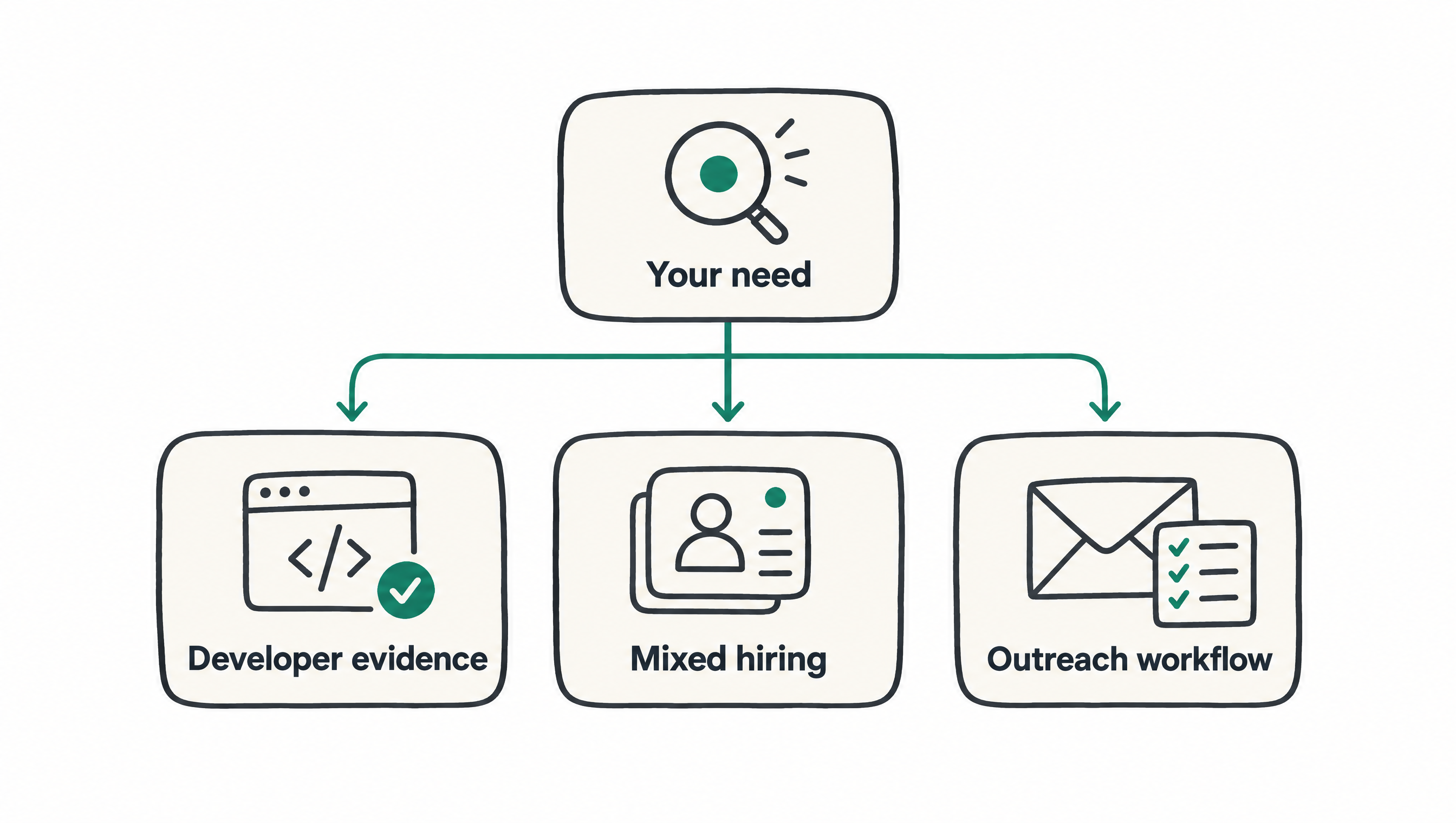
Choose specialist research for evidence-heavy developer hiring
Use a specialist developer research tool when public technical work can answer questions that a conventional profile cannot. Write the role requirements as observable criteria. Then ask the tool to find candidates and show the evidence behind each match.
Review the shortlist with the hiring manager before outreach. Record which findings were useful, which were weak and which qualified people the search missed. This gives you a better decision basis than counting the total number of profiles.
AyHire is relevant when you want to search and assess developers through public GitHub work. Its shared shortlist and evidence links are designed for team review. Its scope is narrower than a general recruiting platform, so confirm that the scope matches the roles you actually hire.
Choose a general database for mixed hiring
Use a general candidate database when one team sources many kinds of role and needs consistent access to professional profiles. Test it with contrasting vacancies rather than the easiest open role. A platform that works for a common commercial search may still struggle with a narrow engineering brief.
Ask hiring managers to judge a sample without knowing which search produced it. Look at relevance, available evidence and the work needed to prepare each profile for review. The broadest database is not automatically the most useful if recruiters must conduct extensive research elsewhere.
Choose an outreach platform when follow-up is the bottleneck
Use an outreach platform when your team already finds suitable people but loses time to list management, reminders or disconnected communication. Map the current steps from approved candidate to first contact and response handling. Then test whether the platform removes specific manual work without removing recruiter review.
Keep message quality separate from delivery volume. Build a small approved list and inspect each message before it is sent. If the tool also offers sourcing, compare those results with your existing source rather than accepting a combined demonstration as proof of both functions.
Choose manual sourcing to learn before buying
Use manual search when hiring is occasional or when the role is too new for the team to define a stable process. Track each query, profile reviewed, reason for rejection and evidence used. The aim is to discover what a future tool must do.
Set a review point. If the same research steps recur, turn them into evaluation requirements for software. If every search remains highly unusual, a flexible manual method may continue to suit you better than a fixed platform.
Before selecting a product, run a side-by-side test with a live role and require reviewers to trace important candidate claims to evidence. If your team hires developers, you can assess AyHire's approach to evidence-backed developer candidate discovery and decide whether its specialist scope fits your process.
FAQ
What are the top 10 recruitment software platforms?
A reliable top 10 cannot be named without comparing current product scope, pricing and performance under the same criteria. Recruitment software also covers different jobs, including sourcing, applicant tracking, outreach, assessment and scheduling, so a single list can mix products that are not direct alternatives.
For sourcing, first decide whether you need specialist developer research, a broad candidate database, outreach management or a manual toolset. Shortlist products within that category, then test them with the same live role and review method.
What is sourcing in the recruitment process?
Sourcing is the work of identifying and researching possible candidates before or alongside their entry into the formal application process. It includes defining the target profile, searching relevant sources, checking fit, recording evidence and deciding whom to contact.
Sourcing is different from applicant tracking. An applicant tracking system manages people moving through a hiring process, while a sourcing tool helps find or research people who may not have applied.
What are the common recruitment strategies?
Common recruitment strategies include inbound applications, employee referrals, direct sourcing, talent community outreach and specialist agency support. The right mix depends on the role, available internal time and whether suitable candidates are likely to apply without direct contact.
For a difficult developer role, direct sourcing can include reviewing public technical work before outreach. For higher-volume roles, an inbound process may carry more of the workload. Teams can combine methods rather than choosing only one.
What are the top 10 sourcing tools for recruiters?
No defensible top 10 is presented here because consistent evidence for ten named products is not available. A useful shortlist should compare products that solve the same sourcing task, using the same role, requirements and review process.
For technical hiring, compare specialist developer research tools with general candidate databases. Add an outreach platform only if contact management is part of the problem you need to solve.
What should I look for in the best recruiting sourcing tools?
Look for relevant search coverage, inspectable evidence, control over role requirements, suitable team workflows and a clear pricing basis. Test each factor with a real vacancy rather than a prepared demonstration search.
Also record false positives, missed candidates and the manual work needed after each result. A smaller set of well-supported profiles can be more useful than a large list that requires fresh research.
Are free recruiting sourcing tools enough for developer hiring?
Free tools can be enough for occasional developer hiring if your team has time to search public sources and document its work. They are less suitable when repeated research creates a bottleneck or when several reviewers need a consistent shortlist.
Treat recruiter time and review quality as part of the cost. A free search method still needs documented criteria, evidence links and a clear process for removing duplicate or unsuitable profiles.
What are the best AI sourcing tools for recruiters?
The best AI sourcing tool is the one that performs your defined sourcing task accurately enough for human review and shows enough evidence to challenge its output. For developer hiring, test whether it can connect role requirements to relevant public technical work rather than relying only on titles or keywords.
Do not evaluate AI from generated explanations alone. Inspect the linked material, check several rejected and accepted profiles, and keep a person responsible for the final decision to contact someone.
Can a sourcing tool replace recruiter judgment?
No, a sourcing tool should support recruiter judgment rather than replace it. Search results can be incomplete, public information can lack context and a candidate may have relevant experience that is not visible in the sources being searched.
Use the tool to gather and organise evidence. Recruiters and hiring managers should still review fit, decide whether outreach is appropriate and apply the team's hiring policies.
Sources
- AyHire product information
- GitHub recruiting tools guide
- The BEST Sourcing Tools For Recruiters in 2026 by Wiza
Last checked: 2026-11-17